


EaseSuite Release Notes
What's new in 1.2.0.8
- Scans has been renamed Files
- Each file can now be revised, and be put between Draft, Live or Archived, with a revision number set
- Use default saved search to exclude types you don't want to see, e.g. draft or archived by default
- If a new scan comes along, you can revise the existing and archive it, then update associations with the new references (if desired, see job example below)
- This can be important when associating scanned procedures or forms with a job. At a point in time, it can be seen what job followed what revision of procedure/form, with new revisions coming to replace it on future jobs and archive the older versions, yet still retain them and see where they were used on older jobs for compliance/auditing/investigation purposes
- Application chat has been added
- Access it by clicking the chat icon top right of the application
- Choose a person, type message, then send
- "Relates To" shows a list of open forms (sales orders, purchase orders, jobs etc.). You may select one to chat about this item. When you view the item, you'll see a history of the chat in the new "chat" tab.
- Staff images can be added in staff
- If you are utilising the mobile app, you can send messages to mobile users and they can send message back, similarly selecting items to talk about (or general chat)
What's new in 1.2.0.0
Various links have been added when POs/Jobs/SOs are created in Sage Cloud (View Info), with the link taking you straight to the online record.
In supplier / customer areas links are shown on the record and in the search list to take you to Sage Cloud to view or add more suppliers / customers.
What's new in 1.1.9.5
Tags can:
- Now be grouped. Tag groups allow similar tags to be grouped together and they will be kept together in search lists and when selecting. These can be set in settings.
- Each tag group can dictate where a) one tag allowed or b) at least one tag is mandatory for the item to help ensure they are selected correctly.
- Each tag can have a different colour, which can be set in settings.
- Scanned document tags can appear over the top of scans like stamps, e.g.Paid, To Check, Faulty, and use the colour coding for easy status checking.
The tablet search bar, accessible in the stock screen, makes stock taking easy with large buttons, quantity, and search box. It sets the quantity and last verified date and who by when the tick is pressed.
What's new in 1.1.8.6
- File types (Settings)
- Can now have their own code prefix, so when you add a file, select type, it can code it by that type (for ISO9001)
- Print out dialog now has option to attach associate files from a SO/PO/Job onto the email as well as the generated PDF (useful for e.g. statements, quotes that also need to be send with the item). The files that are to be emailed are set by file type in settings, so files of that type will be attached by default.
- Various job/invoicing update enhancements, which allow for internal invoice templates to be used before or after Sage push
- More search fields added to timesheet search
- Complex accounts category population reworked into rules for greater flexibility
- Various synchronisation and enhancements for mobile app, including customisable status filter option for what transfers to app and what doesn't
- Staff map screen added in application for determining mobile app user's last location (updated every 5 minutes when has signal). This requires registration for a Microsoft key (contact us for info).
- More placeholders added for various templates (viewable in Settings > Placeholders)
In purchasing and sales search listings in the Tags search, there is now a new dropdown box that lets you do the following for example (purchasing):
- Find orders containing one or more purchasing tag(s) (as before)
- Find orders containing one or more product tag(s) by selecting "Has Products With Tag(s)" first
- Find orders containing one or more supplier tag(s) by selecting "Has Supplier With Tag(s)" first
The same is implemented for sales orders.
Saved search notifications have been improved.
- Notifications can be specified when records are found or not found (and more)
- A saved search can look against a related saved search, then notify/run based on it's results
- The notification can trigger for one saved search, then lead to the results of another (on notifications/dashboard)
Here is an example of typical use for recurring sales orders:
- For a sales order, add in a tag "Recurring Monthly"
- Create a saved search "Last month's recurring sales orders", which should search for "Last Month" on order date and contain the tag "Recurring Monthly"
- Create another saved search "Notification for this month's recurring sales orders", doing similar but looking at this month instead
- For this saved search, pick the related saved search to be "Last month's recurring sales orders" and set notify when to "Related Record Count Greater Than This" and tick "Use Related Search For Notification Listings" (optional).
- What this does is trigger a notification if you have more recurring sales orders last month than you do this month, then from the notification lists last months recurring invoices are shown.
- You can then start cloning those that are missing into this months, or if they should no longer recur then you can simply remove the tag from last months to stop them recurring and the notification.
- This is just one example. The feature is powerful and can be used for many more notification uses.
- Email attachments, or even whole messages themselves can be dragged straight from Outlook into the files sections of a purchase order, sales order, job, product (or any other item with files) to associate them. Previously you had to save the attachments first before dragging them on.
- We've started work on a "trainer" that can extract email content from the likes of Amazon/Ebay/Paypal into a purchase order and automatically attempt to create lines and fill in other info from the email, saving a lot of admin time transposing. We'll ship with Amazon/Ebay/Paypal trainers by default, but it will be possible to make your own after you've done it once for a supplier. (Beta)
What's new in 1.1.7.5
We've introduced the initial version of this and will be shipping with some inbuilt rules that can be enabled.
Create rules, such as:
- Auto-lock a sales or purchase order when invoiced (when locked, no more changes can be made)
- Automatically set & progress statuses based on other information
- Apply discounts on a line when customer & product tags match, for example creating flexible loyalty/contract-based discounts
- And a flexible amount of other rules on various items achievable
- The setting of accounts categories on lines can now be achieved by rules/tags
Various jobs/timesheets/purchasing updates
- Sales orders
- VAT Exempt dropped (now goes by 0 rate VAT instead, if 0 all lines 0, if not lines will pick up VAT regularly)
- Jobs
- Total purchase amount now totalled on jobs, alongside sales orders and timesheet totals
- Recalculate job totals button added
- Option to turn off timesheet billing (for e.g. fixed price or using service sales orders only, staff timesheets are counted as normal but not billed).
- 3 new status's added - Enquiry, On hold & Awaiting Invoicing (a state before complete)
- In progress status can either be set manually or automatically by switching on a setting (when automatic, job put into in progress when the start date arrives)
- Job invoice options enhanced with many new options for filtering what you want to bill and how it's laid out
- Timesheets
- Added charge and hour adjustment with reason, allowing billable hours to be adjusted from actual staff hours before invoicing
- Purchase orders
- Added sales price rule selection on reservations, making clear what markup will be added and allowing the chance to change on the fly before converting to sales order
- Supplier invoice no / supplier invoice date added as search columns
- Showing created sales order(s) as search column and additional reservation info
- Reservation search field enhancement
- Payment areas / information can now be turned off/hidden (when fully dealt with in Sage)
What's new in 1.1.7.4
Features:
- Create sales orders/credits, both full invoices and quick entries
- Create purchase invoices/credits, both full invoices and quick entries
- Supplier download/sync
- Customer download/sync
- VAT rates and accounts category/sync
The concept of goods & services has been added throughout the system.
- A product can be goods (i.e. physical stock) or a service (i.e. utility bill, 3rd party service purchased or service sold)
- On each sales order & purchase order line, there is now "Supply Type", which can either be goods or service
- Customers & suppliers can have a default supply type set (goods or service) and this will default onto the so/po lines when creating a new order (note when selecting a product, it's supply type is used instead)
- Customers, suppliers & stock/products can now be searched by supply type
- Supply type can be set in bulk using the "Bulk Update" functionality, which is available in the 3 areas mentioned for quick population
- Goods/service lines carry onto Sage cloud invoices for European customers & suppliers and thus onto ECSL submissions
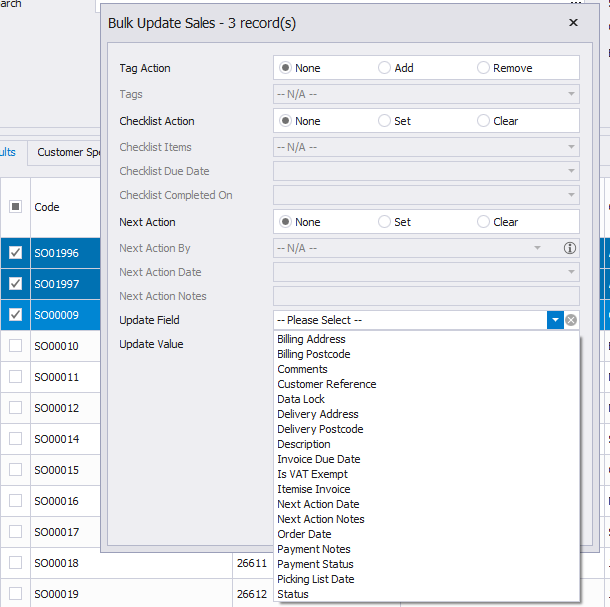
We've added Update Field & Update Value to the bulk update option, available on several search screens.
After selecting one or more records, you can pick a field such as status, then choose what to change it to, which will affect all selected records at once.
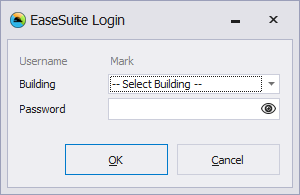
The EaseSuite login form, which if enabled appears after a timeout or computer lock, is now less intrusive. It appears with a minimise button now and may be minimised. The application will also now no longer display until credentials supplied or cancelled (to close).
What's new in 1.1.7.2
- When a listing refreshed after saving, occasionally fields would be blank when the list immediately refreshed (the workaround was to re-search to reflect up-to-date list). This happened in slower network conditions but should now be resolved.
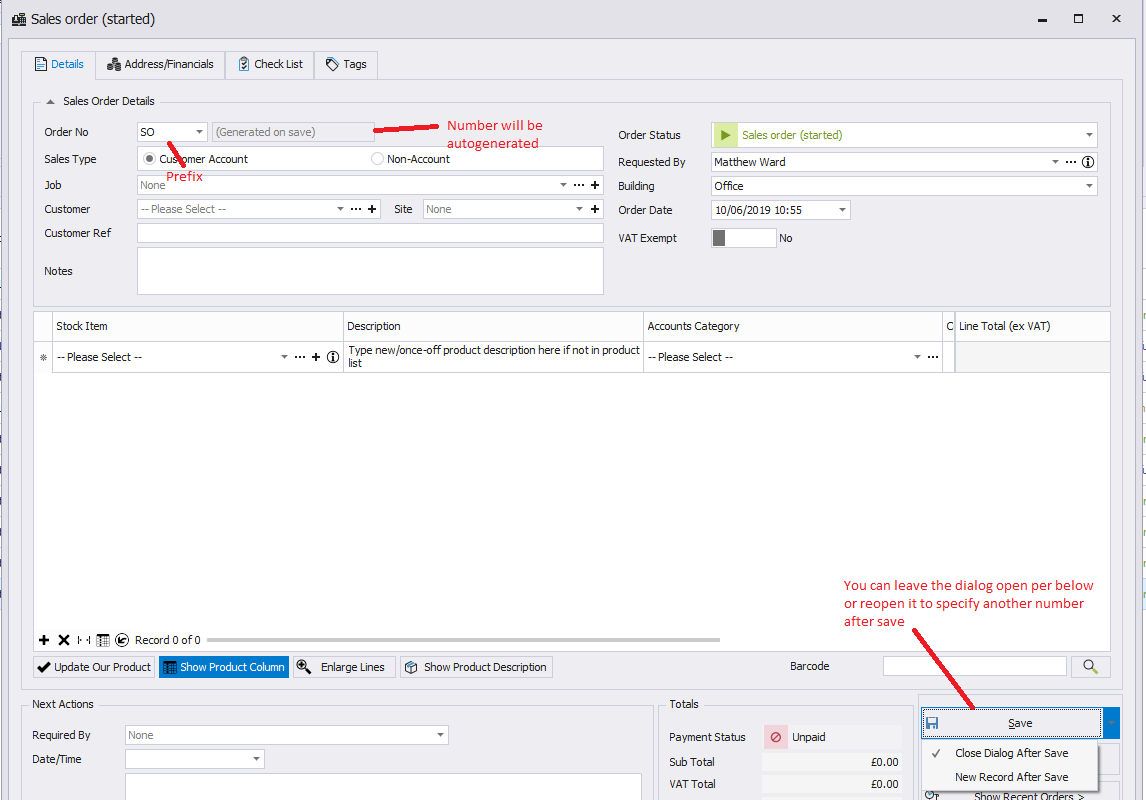
Based on customer feedback we've modified the way codes auto generate (sales orders, purchase orders, jobs).
Instead of supplying a provisional number that may change if it is allocated elsewhere in the interim by another user, we're now only generating this number at time of save and it will only appear then. Whilst the previous approach was OK for infrequent orders, in a multi-user situation it lead to showing a number that may not be final and be wrongly supplied before items were finalised, so we've opted to hide it until final, which also solves number conflicts.
Along with this we've left in the flexibility of different prefixes, since often customers use prefixing as a categorisation. Numbers run sequentially per prefix.
The generated number can also be manually changed after save, retaining this functionality, for cases where e.g. a purchase order number book is being followed and they need to match/ be aligned.
What's new in 1.1.7.1
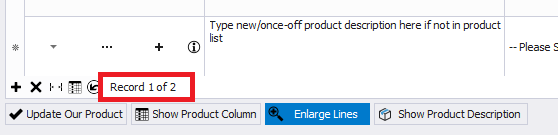
All grids now show record position and count (searches, sales/po lines etc.)
What's new in 1.1.7.0
- Customers, suppliers, recent activity and staff planner added to "Start Area" (individual users can choose what area they wish to start on when the application opens)
- Minor bug fixes
- The DirectX issue mentioned in the previous release has been resolved and the setting can be turned back on in Settings (essentially when on graphics card hardware acceleration is used for faster rendering)
Sage Improvements & Sage Cloud initial integration
- Sage Line v50 (desktop)
- Sage customers & supplier import now much faster and it only processes records from Sage that have changed or are new
- Importing occasionally stopping mid way now fixed
- Percentage indicator added
- More customer/supplier fields coming through, such as website
- Address handling now much improved by hooking into new Sage fields, plus address fallbacks e.g. the contact address is used instead of registered if registered is not found (usually a legacy data issue)
- As a consequence of improvements, support for early Sage versions is now dropped. Was backwards compatible to v12, but now from around v19/20 to match customers
- Sage Cloud initial release
- This can pull in accounts categories, VAT rates, customers and suppliers from online Sage Cloud
- Invoice and purchase order pushing is currently in progress, but all the groundwork has been set for it. We will be implementing quick entries, which push straight to the ledger.